
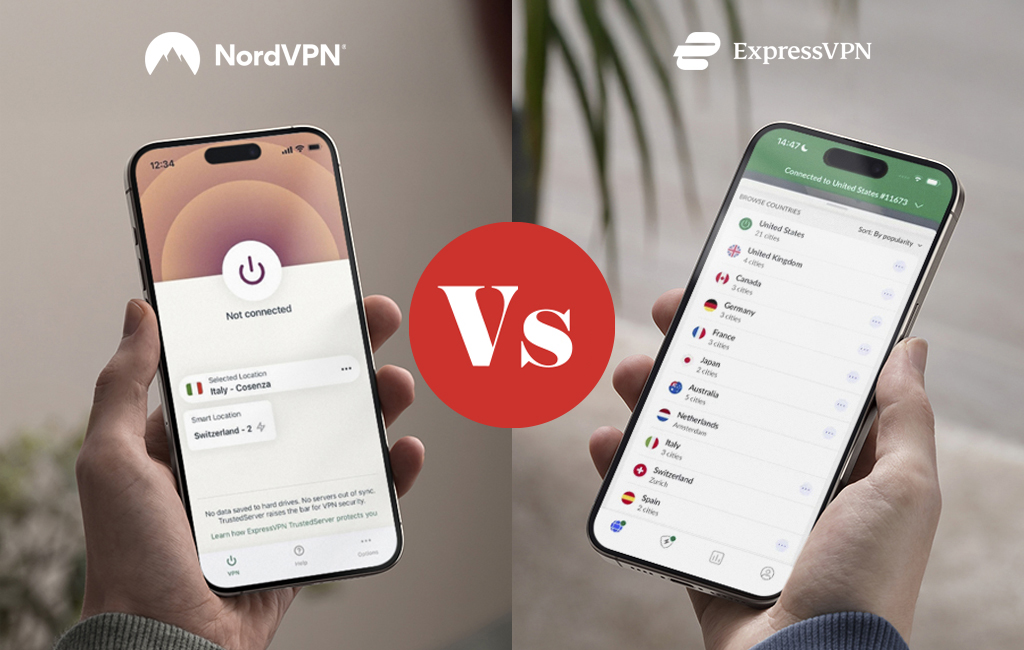

Choosing between a well-established VPN provider and a newcomer isn’t that hard. But choosing between two premium providers with glowing reputations can be challenging. We’ll compare ExpressVPN to NordVPN to see which, if any, has the more compelling offering.
| ExpressVPN | NordVPN | |
| Rating | 87.9% | 92.3% |
| Best price | $3.49/month | $3.09/month |
| Servers | 3000 | 8000 |
| VPN Protocols |
|
|
| Streaming services |
|
|
| Platforms |
|
|
| No logs policy | Yes | Yes |
| Connections | 8 simultaneous connections | 10 simultaneous connections |
| Best for | Privacy, security, and streaming | Privacy, security, and convenience features |
| Website | Visit site | Visit site |
Company background
ExpressVPN
 (Salon)
ExpressVPN is based in the British Virgin Islands, a jurisdiction that does not have mandatory data retention laws and is well outside the Five/Nine/Fourteen Eyes intelligence-sharing alliance.
It is owned by Kape Technologies, which is a British-Israeli digital security outfit that purchased ExpressVPN in 2021. While there haven’t been any significant controversies surrounding ExpressVPN, Kape Technologies’ suspected ties to the Israeli military may raise concerns.
That being said, ExpressVPN’s privacy practices include some “gold standard” stuff like RAM-only servers that are wiped at every reboot and its stringent no-logs policy. The company also undergoes regular third-party audits.
NordVPN
 (Salon)
NordVPN is a Panama-based provider, so it is outside the Five/Nine/Fourteen Eyes jurisdictions as well. While the service operates from Panama, its parent company, Nord Security, is based in Lithuania. There are no Five/Nine/Fourteen Eyes there either.
While NordVPN benefits from a generally positive reputation, when it suffered a breach on one of its servers in 2018, it waited a year to inform its users. They fixed the breach immediately and seemingly no user data was compromised.
Whether the above is enough for you to steer clear of NordVPN, I’ll leave up to you. However, bear in mind that NordVPN submits to regular third-party audits and strongly focuses on user privacy, as evidenced by its solid no-logs policy. NordVPN, like ExpressVPN, also employs RAM-only servers.
Performance and speed
While speed will always be an important metric for potential VPN users, it’s important to understand that every VPN out there will cause your connection to take a speed hit. That’s because of the overhead caused by the encryption/decryption.
ExpressVPN
ExpressVPN is a high-end VPN service. As such, you’d expect its performance to be above average, and it is. When doing things like online gaming, torrenting and streaming while connected to ExpressVPN, I didn’t experience any lag, buffering or freeze-ups on any of the servers I tested.
I got good ping times (low latency) and good throughput (fast connections) in my speed tests. The slowdown I was experiencing was roughly 30-35%. That’s not the smallest slowdown I’ve seen, but it’s well within the average, and my connection remained fast and stable. And, to be honest, had I not explicitly tested my speeds, I probably wouldn’t have noticed the slowdown.
NordVPN
As with ExpressVPN, NordVPN’s performance was also excellent with online gaming, streaming, and torrenting, with no hiccups whatsoever. So, it’s pretty much on par with ExpressVPN here.
But when it comes to speeds, NordVPN did better than ExpressVPN. Pretty much across the board, NordVPN took a smaller speed hit. It was between 10-15% when averaged out. This is impressive. NordVPN is one of the VPN providers that can offer the best speeds. If this were a contest, NordVPN would take the prize for speed.
Streaming and geo-unblocking
ExpressVPN
ExpressVPN’s streaming performance was spectacular. In my testing, it unblocked everything I threw at it. Specifically, ExpressVPN allowed me to access:
- Netflix
- Hulu
- BBC iPlayer
- Disney+
- Prime Video
- ESPN
- HBO
- ITVPlayer
I tested the above using servers in the United States, Germany, France and the United Kingdom (ITV Player only worked on UK servers). And was able to access each region’s library. And, again, no buffering or lagging, even on 4K content. It just worked.
ExpressVPN provides native apps for AppleTV, AndroidTV and Amazon Fire/Fire TV Stick. So you don’t need a VPN router or connection sharing to stream over VPN. You can keep it simple and have a native VPN experience on your smart TV.
You also have the option to use ExpressVPN’s Smart DNS service, called MediaStreamer, which also works reliably. MediaStreamer uses special DNS servers to unblock streams from other regions, but it does not encrypt your connection or change your IP address (location), as it’s not a VPN.
Streaming support is one of ExpressVPN’s strong points beyond its privacy and security practices.
NordVPN
ExpressVPN’s streaming performance might be difficult to beat, but NordVPN is no slouch in that area either. NordVPN successfully provided access to:
- Netflix
- Hulu
- BBC iPlayer
- Disney+
- Prime Video
- HBO
Again, the regions tested were the United States, the United Kingdom, France and Germany. I could access all those local libraries. And there were no lagging or buffering issues. I was getting 4K streams that were crisp and snappy (loading quickly, resuming without buffering after pausing, etc.).
On the downside, NordVPN doesn’t provide native apps for streaming boxes, so you’ll either need to set up a VPN router or share your computer’s (VPN) connection to get your smart TV on VPN.
Alternatively, you can use NordVPN’s SmartPlay Smart DNS feature. SmartPlay is NordVPN’s MediaStreamer. It works the same way, does the same things, and is as reliable as its ExpressVPN counterpart.
This one simply comes down to the number of streaming services supported and the availability of native apps, in my book. ExpressVPN wins it here.
Torrenting and P2P
ExpressVPN
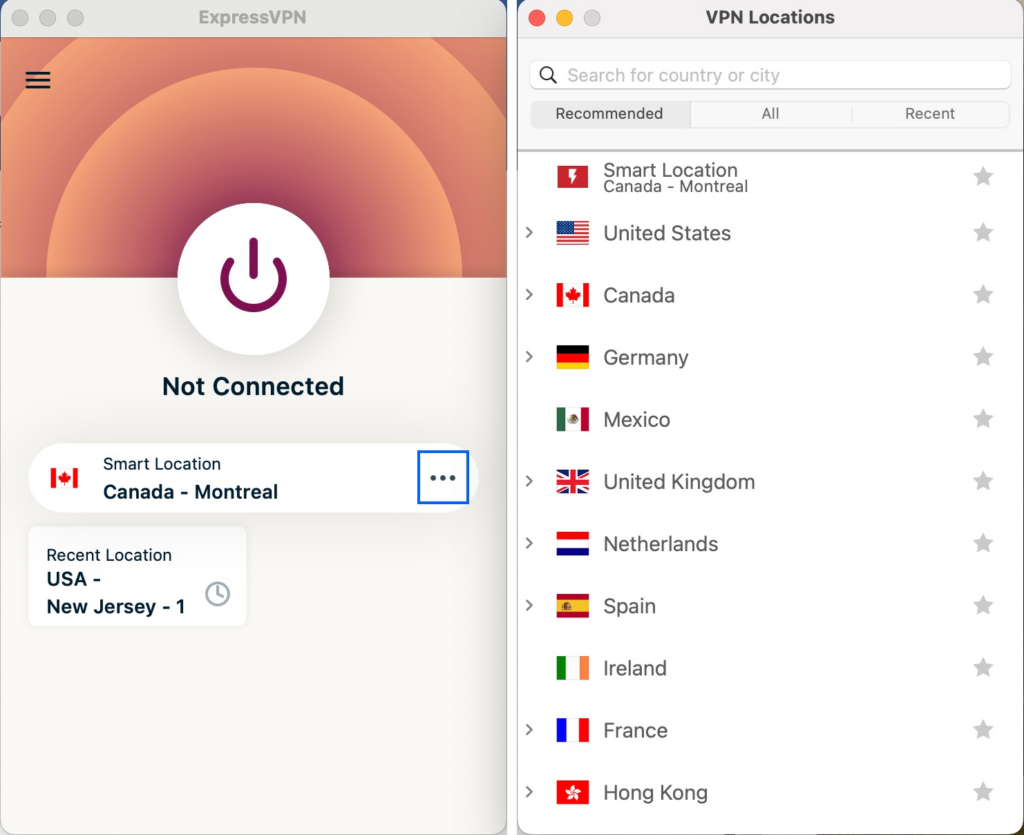
With ExpressVPN, torrenting is allowed on all servers. As such, there are no dedicated torrenting servers to choose from. While torrenting is available on every server, some will work better than others (i.e., servers closer to your physical location will likely provide better speeds and lower latency). It may also be wise to avoid jurisdictions with more stringent copyright laws (U.S. servers).
Simply click the … on the main interface to display the server list and pick a server.
 (Salon)
If you remember the above, your torrenting experience over ExpressVPN will be excellent. Its in-tunnel DNS and kill switch should prevent any leaks, even unattended. And in my testing, torrenting over ExpressVPN was fast and smooth, and I didn’t experience any disconnects.
Excellent performance on the torrenting front.
NordVPN
NordVPN, while still providing excellent torrenting support, takes a different approach. NordVPN offers dedicated P2P-optimized servers. So, to torrent over NordVPN, you should pick one of those. They’re accessible from the main app menu. Clicking the … next to P2P opens the server list.
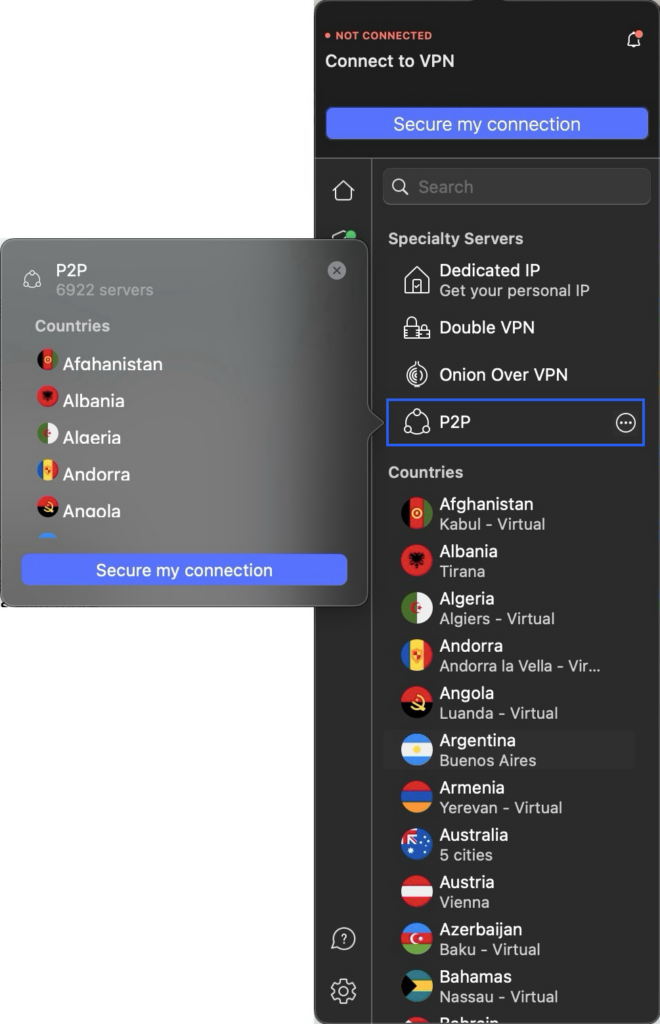 (Salon)
Once connected to a P2P server, you can go ahead and launch your torrent client and unleash your inner torrenter. As was the case with ExpressVPN, in-tunnel DNS and the kill switch will prevent any data leaks, even if your VPN connection should unexpectedly drop.
And, as expected, NordVPN’s performance with torrenting was fantastic. Uploads and downloads were fast and didn’t idle. I also didn’t experience any random disconnects.
However, while both providers perform torrenting, it’s important to remember that the peers you’re connecting to and their network conditions also have a determining effect on your torrenting; it’s not just the VPN.
I’d call this one a draw; it comes down to your preferences regarding dedicated P2P servers.
Security and privacy features
ExpressVPN and NordVPN are both top-tier providers, so you may have noticed that the results can be very similar. And that’s going to be especially true when it comes to privacy and security, as we’re about to see.
ExpressVPN
As mentioned above, ExpressVPN uses RAM-only servers, ensuring all data is wiped from memory at every reboot. While more expensive to maintain, this is the most secure way to deploy a VPN server.
The VPN protocols it supports are:
- OpenVPN
- IPsec (IKEv2)
- Lightway
Lightway is ExpressVPN’s in-house protocol, meaning ExpressVPN developed it itself. To its credit, the protocol’s core code has been open-sourced and verified. I’d still favor using industry-standard protocols, like OpenVPN and IPsec, but given that ExpressVPN has open-sourced the protocol, it makes me less wary about using it.
You, of course, get the obligatory in-tunnel DNS servers along with a kill switch to prevent data leaks. And you also get a strong no-logging/privacy policy, which is certified by regular third-party audits.
That’s a pretty complete picture. However, ExpressVPN falls a bit short when it comes to extra features. We don’t get multihop connections, which route your traffic through one VPN server before forwarding it to a second one, providing an extra layer of security and making you even harder to identify uniquely.
We also don’t get Tor (the Onion Router) over VPN. The Tor network is an anonymity tool that encrypts and routes your traffic over multiple Tor nodes (servers, if you will) located in various jurisdictions, before sending your traffic off to its ultimate location. Tor and VPNs can be combined for extra security and privacy. Bear in mind that Tor will slow your connection down significantly (more than a VPN, most of the time).
I’d love to see ExpressVPN support these features in the future.
NordVPN
Things are remarkably similar on the privacy and security front with NordVPN.
Like ExpressVPN, NordVPN uses RAM-only servers, which provide the same benefits (no remnant user data upon reboot).
The VPN protocols it supports are:
- OpenVPN
- NordLynx
- NordWhisper
NordLynx is NordVPN’s homegrown protocol, which is based on Wireguard, but with proprietary add-ons to enhance the protocol’s privacy (namely by making sure the server isn’t aware of the IP addresses assigned to connected clients by implementing double-NAT). While WireGuard is open-source, the add-ons provided by NordVPN are not, so you still need to trust that it did things right.
On the plus side, NordVPN undergoes regular third-party updates, ensuring its systems work as stated and that NordVPN’s privacy and no-logging policies are more than just words. And, as you may have guessed, NordVPN provides in-tunnel DNS servers and a kill switch in all its apps.
 (Salon)
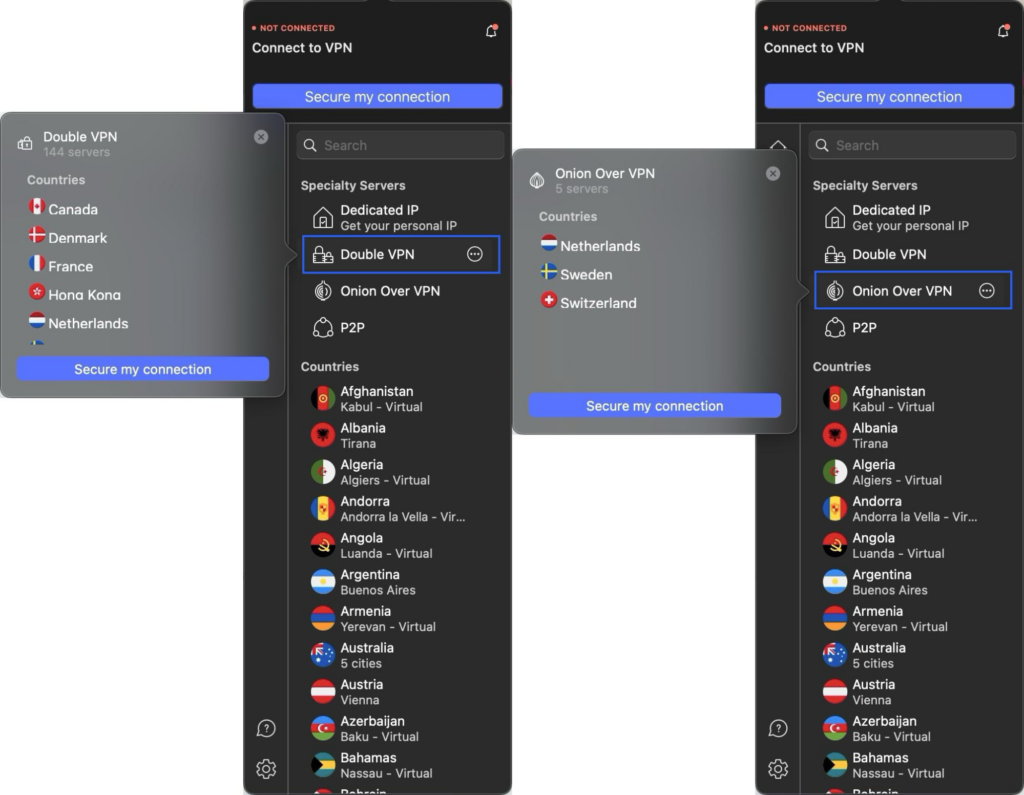
So, a very similar privacy and security posture between the two providers. However, while NordVPN supports multihop connections or Tor over VPN, ExpressVPN does not. However, ExpressVPN offers IPsec while NordVPN does not.
Features and extra tools
The number of bundled goodies you get with your VPN subscription depends on the plan you sign up for. So, we’ll compare the extra features each provider offers when signing up for its biggest plan to ensure we cover everything you can get.
ExpressVPN
With ExpressVPN’s Pro plan, which costs $7.49 per month on a two-year plan, you get the following (on top of your VPN subscription):
- Ad/Tracker/Malicious Sites/Porn Sites blocker
- MediaStreamer (SmartDNS service)
- Password manager
- Identity Theft Protection (ID alerts and ID theft insurance)
- Credit Scanner
- Credit Reports
- Data Removal Service (automatically removes your data from major data brokers’ databases)
- Five-day eSIM service when travelling
- Dedicated IP (access to your own private VPN server with a fixed IP address)
- 75% off the purchase of an Aircove router (preconfigured with ExpressVPN)
NordVPN
When you sign up for NordVPN’s Prime plan, costing $6.89 per month on a two-year plan, you get:
- Ad/Tracker/Malware blocker
- SmartPlay (SmartDNS service)
- Password Manager
- Data Breach Scanner
- 1 TB of encrypted cloud storage (NordProtect)
- Dark Web Monitoring
- 1-Bureau Credit Monitoring
- Credit Score Analysis
- Credit Freeze Assistance
- Identity Theft Insurance
- Cyber Extortion Insurance
- Data Removal Service (Incogni)
The offerings are very similar indeed. But, given that NordVPN offers more extra features for less money, it tips the scales. Plus, it supports multihop and Tor over VPN, where ExpressVPN does not.
Server network and coverage
ExpressVPN
ExpressVPN provides access to more than 3000 servers in over 105 locations worldwide. Its offering comprises a mix of physical and virtual servers. Some VPN providers offer more servers. But very few providers implement obfuscation on all their servers, and ExpressVPN does just that. That means technical measures have been put in place on all its servers to mimic regular HTTPS traffic and hide the fact that you’re using a VPN. This makes the fact you’re using a VPN much harder to detect and to block your connection.
It’s also important for VPN providers to host servers in widespread geographic locations, so users from around the world can find servers close to their actual location and to make sure their users are spread out across the server network to avoid congestion and provide sufficient bandwidth for all users.
3000 servers in 105 locations will be more than enough for that.
NordVPN
For its part, NordVPN has over 8000 servers spread across 165 locations, more than double the number of servers provided by ExpressVPN. As with ExpressVPN, NordVPN also offers a mix of physical and virtual servers. So if 3000 servers were enough to guarantee good speeds and enough bandwidth for every user, 8000 will surely do as well.
It also provides obfuscated servers, but obfuscation isn’t enabled across the board. To use obfuscated servers with NordVPN, you need to switch your VPN protocol to NordWhisper. Once you do that, the server list updates to the subset of NordWhisper servers, so you can just connect like normal to use an obfuscated server.
Pricing and plans
ExpressVPN
ExpressVPN offers three subscription plans, Basic, Advanced, and Pro, available monthly, yearly, or on a two-year basis. Each plan provides up to eight simultaneous connections and a 30-day money-back guarantee.
You can look at what each plan includes for its price here. But here’s a breakdown of the cost of ExpressVPN’s basic plan for each of the three terms.
- Monthly: $12.99
- Yearly: $4.99
- Two years: $3.49
Currently, if you sign up for a two-year plan, ExpressVPN will throw in 4 extra months of service for free.
Regarding payment methods, ExpressVPN accepts all major credit cards, PayPal, Google Pay and Bitcoin.
NordVPN
NordVPN, for its part, offers four subscription plans: Basic, Plus, Complete and Prime. And you can sign up monthly, yearly or on a two-year basis. Where ExpressVPN’s plans allow for up to eight simultaneous connections, NordVPN ups that number to 10, while also offering a 30-day money-back guarantee on all plans.
You can look at NordVPN’s prices and offerings here. Below is a breakdown of NordVPN’s Basic plan for its three terms.
- Monthly: $12.99
- Yearly: $4.59
- Two years: $2.99
NordVPN is currently running a promo that will give you three extra months free when you sign up for any plan on a yearly or two-year basis.
NordVPN accepts all major credit cards, debit cards, Apple Pay, Google Pay, PayPal and CoinGate, which allows users to pay with Bitcoin, Litecoin, Ethereum and many other cryptocurrencies.
User feedback / daily use
ExpressVPN
ExpressVPN has a TrustPilot score of 80% (four stars), based on 26,134 reviews. That’s a good score.
And I have to agree. In my testing, ExpressVPN was fast and stable. I didn’t experience buffering issues when streaming or latency issues when gaming (as long as I was connected to a nearby server). And I got zero connection drops. The kill switch would have limited the damage, but it wasn’t required.
What users tend to highlight the most in their reviews are the service’s reliability and its ability to bypass censorship. Remember, obfuscated servers are the default with ExpressVPN. It appears that’s not going unnoticed. Its streaming performance is often touted as one of its strongest selling points, very much in line with my experience.
While I didn’t encounter any issues when contacting ExpressVPN’s support department, the biggest gripe regarding the negatives is just that. Some users stated they had difficulty contacting support or had high wait times. Others had issues with cancellations.
I can’t weigh in on others’ individual experiences, but that was simply not my experience. I’ve previously canceled an ExpressVPN subscription and didn’t run into issues. But hiccups can happen, and with a score of 80%, that’s what this appears to be.
The bottom line is that ExpressVPN is one of the more established VPN providers out there. They’re definitely worth trying if you’re looking for a VPN service.
NordVPN
NordVPN has a slightly higher TrustPilot score of 84%, based on 43,838 reviews. If 80% was good, 84% is even better,
Again, I have to agree. This comparison post is between two of the most popular and well-established players in the VPN space. The differences won’t be night or a clear winner or loser.
As with ExpressVPN, my experience with NordVPN was a fast, stable connection for streaming, gaming, and torrenting. There are a few more hoops to jump through when using NordVPN because they have subsets of servers dedicated to P2P and obfuscation. But some may prefer a more deliberate approach rather than ExpressVPN’s “always-on” philosophy.
NordVPN is a top-tier provider, perhaps the most popular VPN provider out there, it’s bound to have a lot going for it.
NordVPN users tend to highlight the service’s fair prices (particularly on multi-year plans). They appreciate NordVPN’s support team quickly providing the answers they need. Users also point to their connection’s speed and stability. What’s a bit funny, however, and this highlights the subjective nature of experience, is that the negative reviews mention long wait times to get in touch with support and cite unstable connections and slow speeds as the prime reasons for contacting support.
However legitimate the above complaints may be, this did not align with my experience with NordVPN. You can’t please everyone. And I’d say that currying the favor of 84% is still pretty darn good.
The Verdict
I said it above, and I’ll repeat it: These are two of the most prominent players in the VPN space. So, it’s more about the kind of user you are, the features you need, and your budget.
If money is the top discriminator, you should go with NordVPN, as it’s just cheaper (on most plans and not by much, but still…).
If streaming is your top reason for using a VPN, while NordVPN is no slouch on streaming, ExpressVPN will be your best bet. It just works.
More of an “old school” VPN user, looking to focus primarily on privacy and security? This one’s a toss-up. Both providers have an excellent and well-deserved reputation on that front. But each one has a caveat:
- ExpressVPN’s alleged ties to the Israeli military (or any military) might put off the more privacy and security-focused users.
- NordVPN’s 2018 data breach, which took a year to disclose, might do the same.
If you’re looking for a VPN service that supports extra features with its VPN service, like multihop connections and Tor over VPN, then you’ll want to go with NordVPN. And if you specifically need IPsec support, the choice will have to be ExpressVPN.
All in all, you can’t really go wrong with either of these. It just comes down to your use case and perhaps budget.
A sports team that consistently ranks in the top tier of its division is unlikely to be a fluke. The same is true of these two VPN providers. You can’t really go wrong.
Salon has affiliate partnerships, which means we may get a share of the revenue from purchases made through links on this article.
